
Introduction to Board Meetings
(¿Prefieres leer en español? ¡Haz clic aquí!)
The McGill School of Success Board of Directors is the ultimate authority on how the School runs. They set the policies that the CEO/Principal Ms Terry follows when dealing with students, staff, parents and the community. They control School finances, discipline, subject matter that is taught and all other aspects of School operation.
All Board decisions are required to be taken publicly, and (nearly†) all Board discussions are required to be held publicly.
It is your RIGHT to attend Board meetings, whether in person or via phone or Internet. Not only may you attend and listen, but you may also review (nearly†) every single document the Board discusses, even before the Board discusses it. Finally, it is your RIGHT to make your opinion known to the Board. Not only is it your right, but the School would LOVE to hear from more families on issues regarding their kids, their education, and their wellbeing.
Who is on the McGill Board of Directors?
The Board of Directors currently consists of seven members drawn from the San Diego community. You can see who they are by visiting our Board Members page, here: https://www.mcgillschoolofsuccess.org/board-members
When Do They Meet?
The Board generally meets on the third Thursday of the month at 4pm. A full listing of Board meetings can be found on our Board Meetings page, here: mcgillschoolofsuccess.org/bm
On that page, there are several buttons for each meeting. Here is what they do:
Agenda - this takes you to the agenda for the meeting. The agenda lists everything the Board will discuss; they're not allowed to discuss anything without it being on the agenda beforehand. Agendas are generally available three days before a Board meeting. The agenda is also available in a binder by the school office, and you can request that the School give you a copy.
Documents - this button takes you to Google Drive, where you can read all the documents the Board will consider. You may also view these in a binder by the school office, and you can request that the School give you copies.
Join - At the time of the meeting, this button will take you to the online teleconference. You are also allowed to attend in person at the School, if you prefer. Or, you may see the agenda for instructions on how to join by phone.
Minutes - After the meeting, a document will be prepared detailing exactly what the Board decided during the meeting; this button takes you there. These minutes will ALSO include a brief summary of anything you say to the Board.
Recording - After the meeting, this button will take you to a recording of the meeting, so you can see and hear for yourself what went on, if you were unable to attend or simply wish to review.
Sometimes, the Board will cancel a meeting or schedule a special meeting. If you would like to be notified of all meetings and changes to meetings, please click here or call the school office at (619) 629-0770.
Speaking at a Board Meeting
Because Board meetings may have a lot of attendees, they run pretty formally. There is a meeting chair who manages the meeting, including who gets to speak and when the Board votes on an item.
As an audience member, you are only allowed to speak when the Chair asks for public comment, which is once near the beginning of the meeting and then possibly at the start of the discussion on any given item. It is your RIGHT to be heard at those times; if you want to say something at any other time, it is up to the Chair to allow it or not.
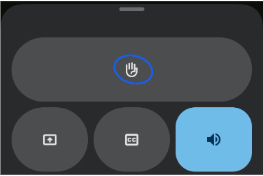
If you want to speak, you need to raise your hand and wait for the Chair to recognize you. How you raise your hand depends on how you are attending the meeting.
If you are at the meeting in person, raise your hand.
If you are attending via Google Meet, use the hand icon. On the desktop, it looks like this:

On your phone, you may have to touch the three dots:

and THEN you will see the hand icon:
If you are attending by telephone, unmute yourself (*6) and ask permission to speak.
Another note: it’s important to use the microphone icon to keep yourself muted until it is your turn to talk:Otherwise, noise on your end may interfere with everyone being able to hear the meeting.

Persons using the dial-in interface should press *6 to mute or unmute.
How Do Meetings Run?
Roll call. This is where we figure out which Board members are present; a majority of the Board is required in order to continue the meeting.
Approval of the Agenda. Here is where the Board may decide to change the order of items or even remove something from the agenda. (Nothing can be added to the agenda, however.)
Non-Agenda Public Comment. This is the part of the meeting where you are allowed to address the Board on any topic relevant to the school, unless that topic is on the agenda already. The meeting Chair will ask for public comment, then you should raise your hand if you would like to speak. The Chair will “recognize” you, at which point you are allowed to speak. The Board imposes a time limit of not more than three minutes (just one minute, if there are many people who want to speak), so be brief. You should not expect a response to non-agenda public comment, beyond perhaps a clarifying question or an assurance that you have been heard. This is also the time when, if you would like to make a comment on an item on the agenda, you should say so. Raise your hand, and when the Chair calls on you, say something like "I would like to comment on item 5.2." or “I would like to comment on items 5.4, 5.8 and 5.15.”
Open Session Meeting Items. This is the time when the Board will go through the items on the agenda, one by one. If the item is marked “INFORMATIONAL,” then the Board just listens to a presentation and asks questions. If the item is marked “ACTION,” then the Board discusses the item and then votes when the discussion finishes. If you have previously asked to comment on a particular item, you should raise your hand as soon as the Chair announces the item is going to be presented/discussed. The Chair will recognize you and then you may speak (the same time limits apply as above.) If you forgot at the time of non-agenda public comment to say you wanted to comment on any given item, feel free to raise your hand anyway. The Chair will most likely allow you to speak.
Closed Session Meeting Items. As previously mentioned, some items that might violate privacy or jeopardize negotiations will be discussed in closed session. The public is not allowed to hear discussion in closed sessions, but they must announce beforehand what they will discuss, and you have a right to make public comment on that before they go into closed session. The Board is not allowed to reveal what was said in closed session. However, if the Board makes any decisions, those will be announced once the closed session ends.
An Alternate Method of Public Comment
If you would like to speak to the Board but are not able or comfortable doing so verbally in the meeting, you may send your comment to the CEO/Principal or leave a note marked “For Public Comment” at the School office. Your comment will be read/summarized during the meeting, and will be added to the Board proceedings for that meeting.
Need Translation?
If you need to have the meeting translated for you, please contact the School office in person, by email (office@mcgillschoolofsuccess.org) or phone ((619) 629-0770) at least two hours before the meeting.
In Conclusion
Please give your input to the McGill School of Success Board! We need everyone’s voice to be heard to make this school the best it can be. You will be welcomed and listened to with respect and attention.
--
†The only documents and discussions that aren't public are narrowly defined in the Brown Act to protect negotiations and student and staff privacy in limited situations.


Comments